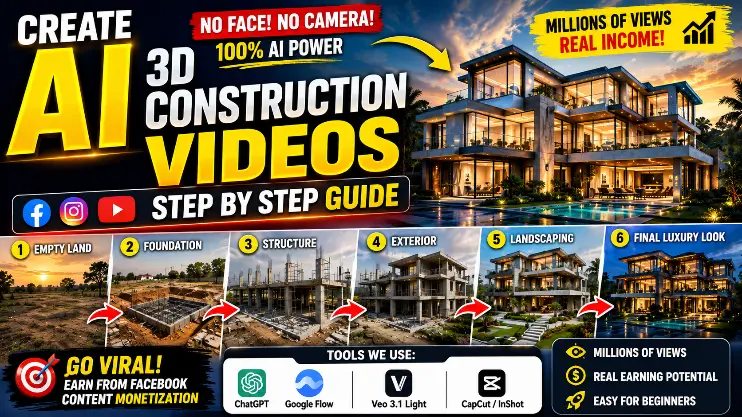
In the past few months, you’ve surely seen videos on Instagram Reels, Facebook Reels, and YouTube Shorts where an old or empty plot of land is transformed in just a few seconds into a magnificent luxury villa, a modern glass house, or a tall skyscraper building. These 3D building transformation and construction time-lapse videos are being widely loved, with many of them reaching not just millions, but even hundreds of millions of views.
The best part about these videos is that you don’t need to show a human face. With just a good story, captivating visuals, and the right AI prompts, you can create content that viewers love to watch until the end. This is why many new creators are also quickly building an audience in this category by making their own content.
Why are AI construction videos becoming so popular
Social media platforms favor videos that maintain audience attention from start to finish. When an ordinary space is gradually transformed into a beautiful modern building, people are left curious to see what the final result will be. This curiosity helps increase the video’s Watch Time and Audience Retention.
Additionally, with AI-powered Construction Transformation Videos, you can work on a variety of themes, such as :-
- Luxury Modern Mansion
- Glass House Transformation
- Home Renovation Before & After
- Beach Villa Construction
- Mountain House Build
- Desert to Luxury Villa
- Modern Farmhouse
- Smart Home Design
- Skyscraper Construction
- Resort Development
Each video can have a different concept, making your content worth watching again and again and keeping the audience engaged.
Google Rolls Out June 2026 Spam Update How to Protect Your Website Rankings :- Read More
Can these videos be monetized
If you build a good audience on your Facebook Page and your content complies with all platform policies, you may have the opportunity to monetize through Facebook’s available Monetization Programs (where applicable).
However, it’s important to understand that simply creating videos with AI is not enough. Your earnings also depend on :-
- Your content is original.
- The video includes your own creativity and editing.
- The platform’s Monetization Policies are followed.
- The audience finds the content useful, entertaining, or engaging.
- No copyrighted or other person’s material is used without permission.
In other words, AI is just an assistant tool. Your creative thinking and content quality are the most important factors for success.
Which tools will be used in this guide
Throughout this guide, we will use tools that are useful for both beginner and experienced creators.
ChatGPT
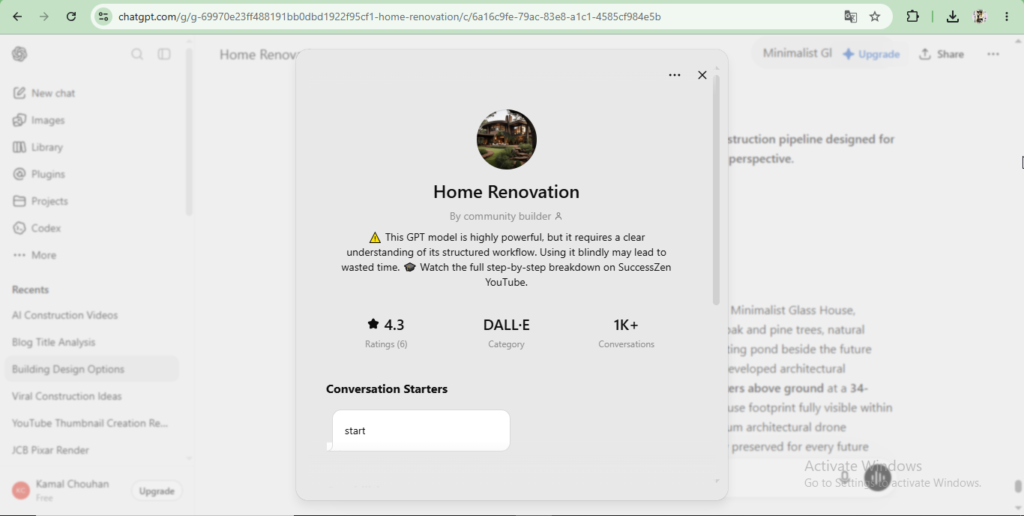
ChatGPT will be used primarily to generate high-quality prompts. If you want better results from AI, writing the right prompt is the most crucial step.
In this guide, we will learn how to use ChatGPT to create detailed prompts that make it easy to create engaging visuals and videos related to construction and home renovation.
Google Flow / Veo 3.1 Light
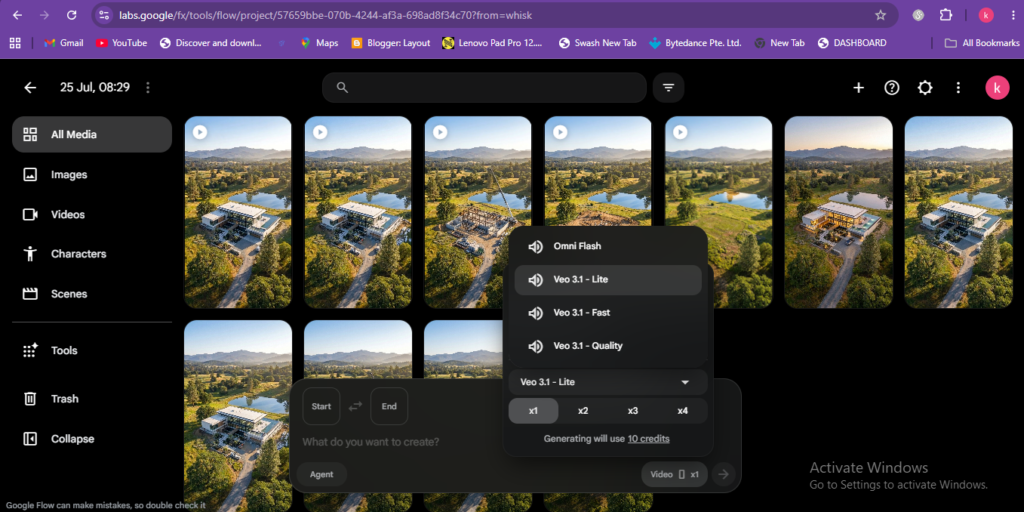
AI video generation tools like Google Flow and Veo 3.1 Light help create cinematic videos based on text or images. By using them with the right prompts, you can create impressive videos like Construction Transformation, Building Growth, and Luxury Architecture.
Video Editor (CapCut, InShot, or any other)
Any standard video editor can be used to make AI-generated videos more engaging. With its help, you can:
- Control the video’s speed.
- Add background music.
- Add text and captions.
- Add smooth transitions.
Prepare the video size according to Facebook, Instagram, and YouTube Shorts.
How to Prepare Professional Prompts for an AI Construction Video with ChatGPT
The most important part of creating an AI construction video is preparing the right prompt. If your prompt is clear, detailed, and well-organized, the resulting images and video from the AI will be more realistic and engaging.
The biggest mistake most new creators make is writing a generic prompt of just one or two lines. This doesn’t give the AI enough information, and the output doesn’t turn out as expected.
To solve this problem, you can use ChatGPT. ChatGPT helps you create detailed and structured prompts according to your needs, making AI image and video generation much easier.
How to Use the Home Renovation GPT in ChatGPT
If GPTs are available in your ChatGPT account, you can use a Home Renovation-related GPT to create specific prompts for construction projects.
The general process is as follows :-
- Open ChatGPT.
- Go to the GPTs or Explore GPTs section.
- Search for the Home Renovation GPT (or an available GPT for a similar purpose).
- Launch the GPT.
- Now, start providing instructions based on your project.
Note :- The GPTs available in ChatGPT can change over time. If the Home Renovation GPT is not available, you can still generate prompts of similar quality in the regular ChatGPT by providing detailed instructions.
Why a Prompt Sequence is Essential for AI Construction Videos
Many people can create a great image, but when they turn it into a video, each scene looks different. Sometimes the building’s color changes, sometimes the camera angle shifts, and sometimes the entire design is altered.
The main reason for this problem is that all the prompts are not connected to each other.
That’s why in a professional workflow, all prompts are prepared in a specific sequence, so that the AI can maintain continuity from one scene to the next.
Prepare 6 image prompts for the construction process
First, divide the building construction into different stages. Prepare a separate image prompt for each stage.
For example, the sequence could be something like this :-
- Image Prompt 1 – Blank Land :- In this prompt, only provide details of the empty plot, the surrounding environment, the camera angle, and the lighting.
- Image Prompt 2 – Foundation Work :- Now, show the building’s foundation, construction markings, excavation, and initial work in the same location.
- Image Prompt 3 – Structure Development :- In this stage, show the walls, columns, concrete structure, and the initial shape of the building.
- Image Prompt 4 – Exterior Completion :- Now, the exterior of the building should be almost complete. Show the windows, glass, roof, and exterior design.
- Image Prompt 5 – Landscaping :- In this stage, add a Garden, Driveway, Swimming Pool, Trees, Decorative Lights, and Outdoor Design.
- Image Prompt 6 – Final Luxury Render :- The final image should be the most captivating, showing the entire luxury building, cinematic lighting, a premium exterior, and a magnificent atmosphere.
These 6 images, prepared in this way, later provide a strong foundation for video generation.
Prepare 5 video transition prompts to connect the images.
It’s not enough to just create images. If you want the video to look like a real construction process, there must be a smooth transition between each pair of images.
This is where Video Transition Prompts come in.
Their purpose is to instruct the AI on how the first Image should gradually transform into the second.
For example :-
- The transition from an empty plot to the foundation being laid.
- From the foundation to the building structure taking shape.
- From the structure to the exterior being completed.
- From the exterior to the landscaping being added.
- From the landscaping to the final luxury mansion.
In this way, a total of 5 Transition Prompts are created that link all the images together and give the entire video a continuous story-like experience.
How to Set Up an Account in Google Flow
First, open the Google Flow website and sign in with your Gmail ID. When you log in for the first time, you will have to select your Google Account, after which you will be taken directly to the Dashboard.
Google periodically makes changes to the free and paid plans for its AI tools. Many users have a limited number of daily free credits available, which can be used for image and video generation. Therefore, be sure to check the number of credits available in your account before you start working.
Free credits and their number can change over time. Therefore, always consider the current information displayed on the dashboard to be final.
Why Correct Image Settings are Important
Many new creators just write a prompt and generate an image, but they don’t select the correct settings. As a result, when they later make a video, the image’s size, quality, or framing doesn’t fit properly.
Therefore, be sure to check some important settings before generating an image.
Aspect Ratio
If your goal is to create videos for Facebook Reels, Instagram Reels, or YouTube Shorts, the 9:16 vertical aspect ratio is the most suitable.
Benefits of this aspect ratio :-
- The entire video is visible on a mobile screen.
- There’s no need to crop it separately for Shorts and Reels.
- The video quality remains better.
- The viewing experience on social media platforms is more engaging.
If the right aspect ratio is chosen from the start, the video editing process will be much easier later on.
Choose the right AI model
Google Flow may have different AI models available from time to time. If options like Nano Banana or Nano Banana Pro appear in your account, you can select one of these models according to your needs and the available features.
Generally, better AI models help with the following :-
- More realistic architecture
- Better lighting and shadows
- Clear texture and material details
- Consistent building design
- Professional quality output
If a different model is available in your account, use that one. Google may change the names of these models or the available options in the future.
How to turn Images into a captivating 3D AI Construction Video in Google Flow
By now, you have prepared professional prompts with the help of ChatGPT and have also created six different construction images using those prompts in Google Flow. Now it’s time to turn these static (Static) Images into an engaging 3D AI Construction Video.
This is the step where your individual images start to appear as a sequential animation. If the process is done correctly, the video feels as if a building is actually being constructed right before your eyes.
Start Video Generation Mode in Google Flow
In the Google Flow Dashboard, you may also find an option for Video Generation alongside Image Generation. First, open the Video Generation section and start a new project.
Keep in mind that Google periodically changes its interface and features. So, if the options look a little different, there’s no need to worry. The main objective is to activate the Video Generation Mode.
Choose the right Video Model
Before generating a video, select the available AI model.
If Veo 3.1 Light is available in your account, you can choose it. Other video models may also be available in some accounts. In that case, choose a model according to your needs and the available options.
After that, if a Frame Mode or a similar option is available, activate it. This Mode helps create a natural Animation between two different Images.
Note :- The Models and features available in different Google Accounts may vary. Therefore, use the latest options available on your Dashboard.
How Frame-to-Frame Animation Works
The core principle of AI Video Generation is that the AI predicts the transition between the first and second frames based on the images. If you also provide the correct Transition Prompt, the AI will try to present that transition in a more natural and cinematic way.
Therefore, the 5 Transition Prompts we prepared in the previous step will now be used.
- Create the first video clip from Image 1 to Image 2 First :- Select the starting image (the empty plot or Before Scene). Add the second image (Foundation Stage). Now, paste the first transition prompt you prepared between them.Generate the video. This will create the first short animation, showing the empty plot of land slowly transform into the start of a construction site.
- Add Image 3 from Image 2 Now :- Select the second image. Add the third image. Use the second transition prompt. Generate the new video clip. In this step, the main structure of the building will be seen developing.
- Add Image 3 to Image 4 Now repeat the same process :- Third Image Fourth Image Third Transition Prompt In this clip, the structure will be seen slowly transforming into the finished exterior
- Add Image 4 to Image 5 Now :- Fourth Image Fifth Image Fourth Transition Prompt In this animation, the landscaping, garden, pathway, decorative elements, and outdoor design will emerge.
- Add Image 6 from Image 5 In the final step :- Fifth Image Sixth Final Luxury Image Fifth Transition Prompt Now the AI will create the final Cinematic Transformation, where the entire Building will appear in its most stunning form.
- This way, you will have a total of 5 different AI Video Clips ready.
Download the Finished Video Clips
When each animation is ready, save all the video clips one by one to your device.
Before downloading, check that :-
- The video has rendered correctly.
- No frame looks broken or unnatural.
- The resolution is clear.
- All clips are saved in the correct order.
- If an animation in a clip doesn’t look satisfactory, you can improve the transition prompt slightly and re-generate it.
At the end of this process, you will have :-
- 5 smooth AI animation clips
- A sequential building transformation sequence
- High-quality video files
Footage ready for professional editing. available.
The next step is to combine all these video clips in a video editor like CapCut, InShot, or other editing software to create an engaging construction transformation reel. There, with the help of background music, sound effects, text animation, and final export settings, you’ll make the video fully ready for Facebook, Instagram Reels, and YouTube Shorts.
Video Editing and Final Touch – How to Make an AI Construction Video Professional
After creating images and video clips with AI, the most important step is video editing. This is the step where your ordinary AI video is transformed into a professional social media reel.
Often, AI-generated clips are good, but without proper editing, the video doesn’t look as engaging. On the other hand, if the editing is done correctly, even a simple AI animation can feel quite premium.
In this stage, our goal is to connect all the video clips in the right order, balance their speed, and make the video more impactful with the help of background music and sound effects.
Add all the video clips in the correct order.
First, open CapCut, InShot, or any video editing app of your choice and create a new project.
Now, import all 5 AI video clips you prepared earlier in the same order that the building’s construction progresses.
The ideal order should be as follows :-
- Empty Plot or Old Site
- Foundation Construction
- Building Structure
- Exterior Completion
- Final Luxury Mansion
If the sequence is correct, viewers will easily understand the entire construction process, and the video viewing experience will be improved.
Maintain a smooth transition
Avoid making cuts between clips that are either too long or too abrupt. If your editing app allows, use subtle, smooth transitions so the shift from one scene to another feels natural. Keep in mind that overly flashy effects or transitions that change too frequently can distract viewers. In construction transformation videos, clean, simple editing is generally more effective.
How long should the video be
On short video platforms, very long videos don’t always perform better. Therefore, try to keep the entire reel between about 30 to 40 seconds.
In this timeframe, viewers can see the entire transformation from start to finish, and the video’s flow is maintained.
If a scene feels too long, its speed can be increased slightly. Conversely, if a key transformation needs to be shown clearly, it can be given a little more time.
How to Publish Videos on Facebook, Instagram, and YouTube
Now your AI-generated video is all set. The next step is to publish it the right way.
As good as the video is, its proper presentation is just as important.
The same video can be published on different platforms by optimizing it accordingly, such as :-
- Facebook Reels
- Instagram Reels
- YouTube Shorts
Each platform has a different algorithm, but high quality, original content, and regular posting are considered important almost everywhere.
What to Keep in Mind for Facebook Monetization
If your goal is to monetize on Facebook, focusing only on views is not enough. You must also comply with Meta’s Monetization Policies and Community Standards.
Some important points :-
- Publish only original content.
- Do not re-upload another creator’s video without permission.
- Avoid using copyrighted material.
- Present AI-generated content with your own editing and creative value.
- Publish quality videos regularly.
- Focus on increasing audience engagement.
Keep in mind that monetization availability can vary depending on the region, account status, and Meta’s current policies. Therefore, be sure to check the information available in your Professional Dashboard periodically.
Can more videos be created daily
If an AI tool has a limit on free credits, the safest method is to use its official free plan, paid plan, or available upgrade options.
Some AI services provide a limited number of free credits per day, while a paid subscription offers a higher generation limit.
Trying to bypass a platform’s set limits by creating multiple accounts may not be in line with the service’s terms of use. Therefore, always use official and legitimate methods. This keeps your workflow secure and reduces the likelihood of account-related issues in the future.
Some Words Of This Post
Today, creating professional construction transformation videos with the help of AI tools is much easier than ever before. By combining the right prompt, high-quality images, smooth AI animation, and effective video editing, you can create content that can capture the audience’s attention on platforms like Facebook Reels, Instagram Reels, and YouTube Shorts.
However, there is no guaranteed shortcut to success on any platform. Consistently publishing original, useful, and high-quality content, following the platform’s policies, and improving your skills over time is the most reliable way to achieve good results in the long run.


1 thought on “How I Create Viral AI Construction Videos Using ChatGPT & Veo 3 (Millions of Views)”