These days, the trend of AI influencers on Instagram is growing rapidly. Previously, people only followed real model-creators and celebrities, but now AI-generated virtual influencers are also racking up hundreds of thousands of followers and brand deals. Around the world, many AI creators like Aitana Lopez and Lil Miquela have proven that without a real face You can also build a powerful online brand.
The most interesting thing is that now you don’t need professional photographers, expensive cameras, or an editing team to create an AI influencer. Today, many people are running Instagram pages solely with the help of AI tools and through sponsorships, affiliate marketing, Paid promotions and fan pages. Some creators even earn thousands to lakhs of rupees a month while remaining anonymous.
If you also want to create unique content on Instagram but aren’t comfortable showing your face, AI influencer could be a great opportunity for you. With the right strategy and attractive AI content, you too can grow a viral Instagram page.
This is where tools like Weavy AI prove very useful. With the help of such AI tools, you can create realistic girls, fashion influencer photos, cinematic images and short videos can be created easily. Whereas before it took hours of editing to create a realistic image, now you can generate high-quality AI content with just a few prompts. This is why even beginners can now create professional-looking AI influencer pages without much technical knowledge.
In this article, we’ll walk you through the step-by-step process of how to use Weavy AI to create an attractive AI influencer, grow your Instagram page, and earn from this trend. So, read this blog post to the end and be sure to share it with your friends.
What is an AI Influencer
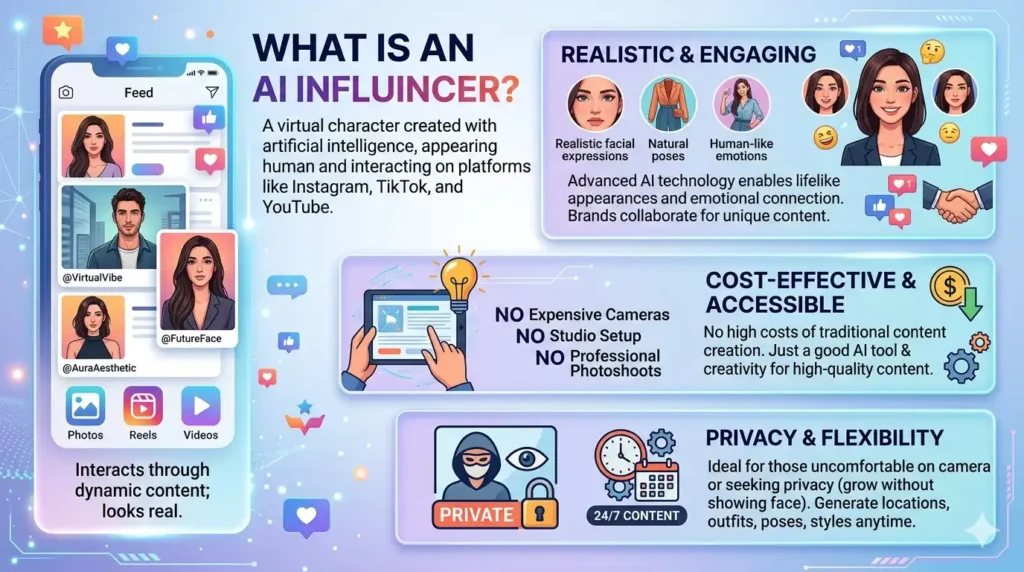
An AI influencer is a virtual character created with the help of artificial intelligence that looks human and interacts with audiences on platforms like Instagram, TikTok, or YouTube through photos, Reels, and videos. Often, people don’t even realize that it’s not a real person but a digital character made by AI.
Nowadays, AI technology has become so advanced that AI influencers can display realistic facial expressions, stylish outfits, natural poses, and even human-like emotions. This is why brands have also started collaborating with AI creators, as they produce unique and attention-grabbing content.
The biggest advantage of creating an AI influencer is that it doesn’t involve the high costs of traditional content creation. You don’t need an expensive camera, studio setup, or professional photoshoot—just a good AI tool and a bit of creativity to produce high-quality content.
Moreover, many people feel uncomfortable appearing on camera. Some want to maintain their privacy or don’t want to show their faces on the internet. In such cases, an AI influencer becomes a perfect option, because you can grow your Instagram page without appearing in person.
Another major advantage is its flexibility: unlike a real influencer, there are no time constraints. With this influencer, you can generate outfits, locations, poses, or styles at any time, meaning your virtual creator is ready to produce content 24/7.
Weavy Ai Setup and Character Creation
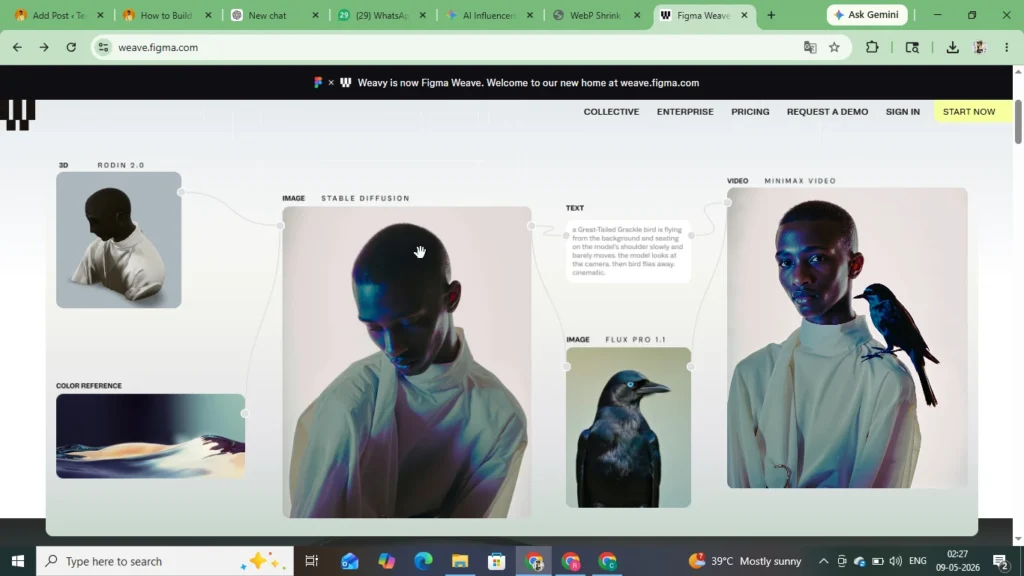
If you want to create a professional AI influencer, the most important thing is to craft a face that looks almost perfect in every image. This, incidentally, makes any AI influencer feel like a real brand. Tools like Weavy Ai make this task much easier because they can quickly generate realistic AI creations and high-quality images. can
How to Create a Character
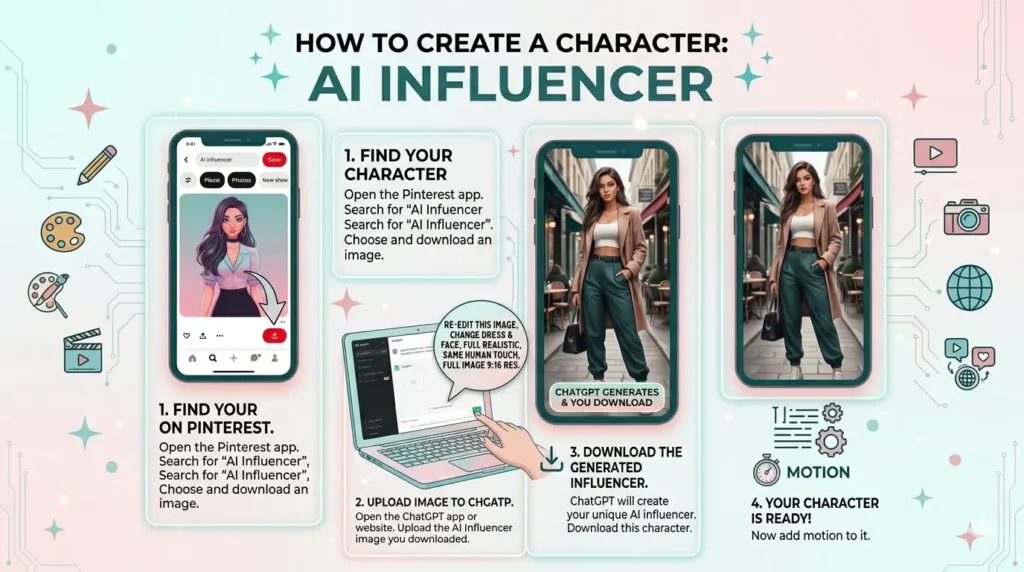
First, to create an AI Influencer, you will need your own character. Follow the steps below:
- First, open the Pinterest app on your mobile phone. You can also open it in your browser.
- Now, after opening the Pinterest app, you will see a search option at the top. Click on it and search for “AI Influencer.”
- As soon as you search for “AI Influencer,” you will see many images. Choose your AI Influencer from them and download the image.
- Now, after downloading the image, open the ChatGPT app on your mobile phone. If you haven’t downloaded ChatGPT, download it from the Play Store or open it in your browser.
- Now, after doing all this, upload the AI influencer image you downloaded from Pinterest and paste this prompt there. “I Am Upload A Copyright AI Influencer Image You Can Reedit This Image New Make AI Influencer Image For Change Dreass And Change Face With Full Realistic And Same Human Toch Image Make A Full Image In 9:16 Resu “
- Now after pasting this prompt there, you need to start the chat. After that, ChatGPT will create an AI influencer for you. Now, download that AI influencer.
- Now your influencer, meaning your character, is ready. Now you need to add motion to it.
Add motion with Weavy Ai
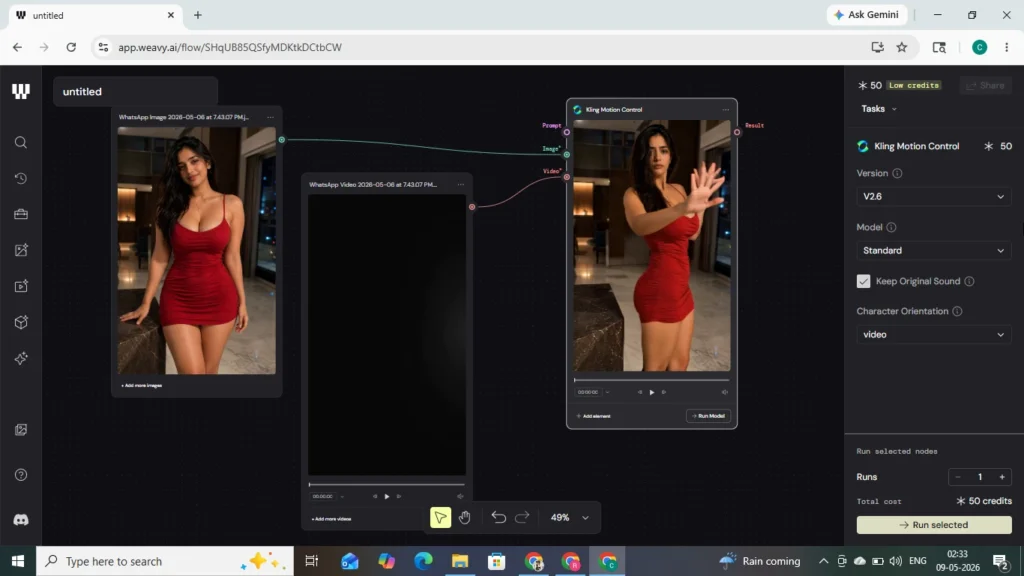
We’ve used the Pinterest app and ChatGPT to create an AI influencer character. Now we need to add motion to it, which we’ll do with the help of Weavy Ai. Follow the steps below:
- Now go back to the Pinterest app and search for “Dancing.” As soon as you search for dancing, you’ll see lots of shorts with different types of motion and dance. Download whichever motion or video you like.
- After doing all this, search for Weavy Ai in your mobile browser. When you search, the first website you see will appear—open it. Now, after opening it, create your account using your Gmail or a temp mail.
- Now, after doing all this, you need to search for Weavy Ai in your mobile browser. When you search, the first website you see is the one you should open. Once it’s open, create your account using your Gmail or a temp mail.
- After creating your account, you’ll see a “Create File” option on the home page. Click it, and a new tab will open.
- Now you will see a video option in the sidebar, or several options. After clicking on them, you will see a Kling Motion option here; select it.
- Now, first, drag and drop your video here, then drag and drop the image. Make sure the image is touching the image slot, the video is touching the video slot, and the prompt is touching the prompt slot.
- And in the sidebar, you need to set the Pro Model to Standard, select the 2.6 option, and click the Run button. After that, wait a moment, and your motion video will be created and appear for you.
- Now you can watch the video and download it. You can also download these Reels, upload them to Instagram Reels, Facebook Reels, and YouTube Shorts, and earn brand deals.
Face Consistency: A Uniform Face in Every Image
When creating an AI influencer, this is the biggest challenge—maintaining the face in every image. At first, some people manage to produce good images, but the face shifts slightly in each photo. It doesn’t look professional on Instagram, and the audience can’t connect with the character.
This is where face consistency plays the most important role. If you and the influencer look the same in every photo, it gradually starts to feel like a real digital personality. This is the technique that major AI creator pages use.
The secret sauce is using Face Lock and reference images.
In Weavy AI, the Face Lock and reference image features are very useful for creating a consistent character. Their job is to remind the AI of the facial structure repeatedly. First, you should prepare a high-quality image of your influencer; this image serves as the reference for future photos.
After that, you can upload that image as a reference and generate new prompts. In each one, the AI will maintain:
- Same face shape
- Same eyes
- Same hairstyle
- Same skin tone
- Same overall personality
tries to maintain the same face shape, same eyes, same hairstyle, same skin tone, and same overall personality. This is what creators call AI character identification, because it’s what makes your virtual influencer unique.
If the Face Lock option is enabled in Weavy AI, it’s even better to keep it on—it greatly improves facial consistency and makes each new image look more stable.
Multi-Pose Generation
Once your AI face consistency is in place, the next step is to show the character in different styles and locations. This is what makes an Instagram page look natural and engaging.
You can create the same AI influencer in various looks, such as gym, Outfit, casual fashion look, and traditional Indian dress, luxury party style, beach photoshoot, paper lifestyle photo, etc. But keep in mind when changing the prompt, don’t alter the facial description too much; only change the output pose and background, like: “Same AI influencer girl, wearing black gym wear, standing in a modern fitness studio, realistic lighting, DSLR photo”
With this technique, your AI influencer will look like the same person everywhere, just like real Instagram model content.
Monumetric Approval Process Explained – Requirements, Traffic Needed & Blog RPM Income Report :- Read More
Why consistency is so important
Both the Instagram algorithm and the audience subconsciously favor consistency. When followers repeatedly see a character, it gradually becomes that character’s identity, which…
- Chances of growing followers increase
- You can get brand collaborations
- The page looks more professional
- Audience engagement improves
Instagram Content Strategy
It’s not enough to just create an AI influencer; if you want to grow quickly on Instagram and get your Reels to go viral, you need to follow the right content strategy. Competition on Instagram is very high today, so smart posting and creating engaging content is essential.
These AI influencer pages grow so quickly because their content offers visual appeal and a modern feel. If you manage your Reels, captions, hashtags, and posting schedule correctly, your chances of going viral can increase significantly.
Turn engaging Reels Ai images into viral videos.
Today, Reels on Instagram deliver the highest reach. Instead of just uploading photos, converting Ai images into short videos or slide show Reels is far more effective.
You can use images generated by Weavy AI to create effects, cinematic transitions, motion animations, and trendy real-style edits. Then add trending Instagram audio to those videos—the algorithm flags your content as tied to a trend, which can boost its reach.
Using Captions and Hashtags
Many people focus only on the image, but captions play a much bigger role in growth. A caption should engage the audience. Instead of very long captions, short and attractive lines are more effective.
How to Choose the Right Hashtags
Instead of using random hashtags, use niche hashtags. This helps your content reach the right audience on Instagram. For AI influencer pages, use hashtags like #AIInfluencer, #virtualmodel, etc.
Posting Schedule
Consistency is the most important factor for Instagram growth. If you post daily one day and then stay inactive for several days, the algorithm may reduce your reach. In the beginning, try to upload one to two Reels daily and three to four high-quality posts per week. Keep your Stories updated regularly on Instagram. But audience activity is often higher in the evening and at night, so these times are generally considered good. Therefore, you should post between 8:00 AM and 10:00 AM. between 6:00 PM and 9:00 PM, and between 9:00 PM and 11:00 PM. However, every niche has a different audience, so it’s important to gradually observe and understand the best timing.
Some Words For AI Influencer
AI content features are growing very rapidly, and in the near future, AI influencers are set to become a major part of the social media industry. Today, what used to be done only by large creators and product teams can now be easily accomplished by beginners with the help of AI tools.
The trend of virtual influencers on Instagram is continuously growing because people enjoy seeing unique styles and futuristic content. This is why brands have also started collaborating with these creators. If you start in this niche now, you can have a great opportunity to build a strong digital brand in the future.
Tools like Weavy Ai have made creating realistic AI images and videos much easier than before. With the right prompt, spacing, consistency, and a smart Instagram strategy, you too can grow a professional influencer page without showing your face.
In the beginning, results come slowly, but if you focus on regular posting and quality content, both your audience and earnings can grow over time.