we will review the Thordata Proxy website and tell you how you can buy the proxy here and how you can maintain your multiple accounts. You have to read this blog article completely so that you can easily understand what a proxy is and how you can access your multiple accounts using a proxy and save them from getting blocked. If you like this blog post, then do share it with your friends.
A reliable proxy service is crucial for success in modern digital marketing and web data collection. Thordata Proxy is a leading proxy service provider serving over 4,000 enterprise clients globally with over 60 million residential IP addresses. When integrated with Anti Detect Browser, the combination becomes a powerful solution for web scraping, e-commerce, marketing, and multiple account management. In this comprehensive guide, we will explain the Thordata Proxy website, how to purchase it, and how to add and run it in your browser.
What is Thordata Proxy website
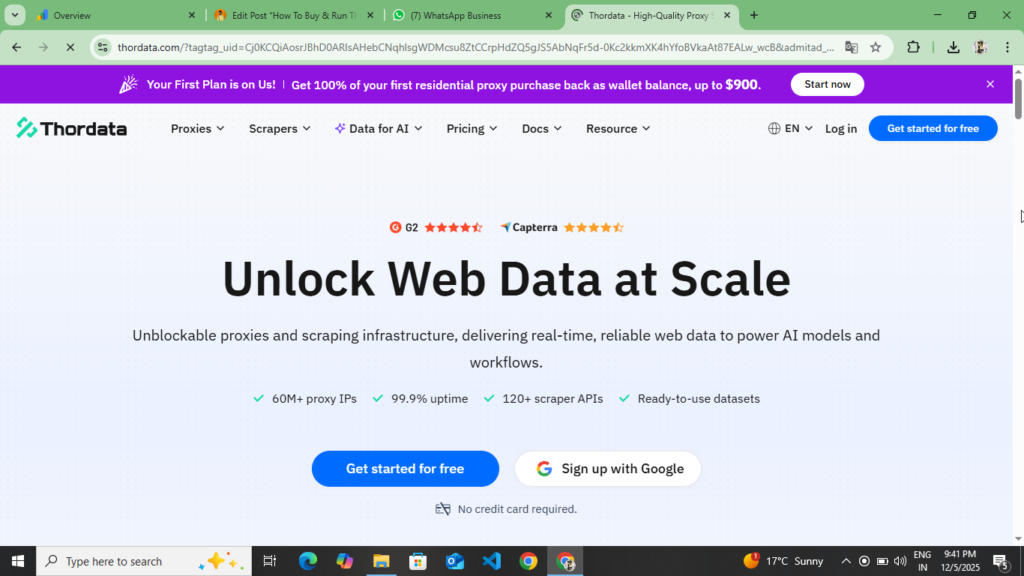
Thordata Proxy is a world-class web data infrastructure platform that provides proxy services and scraping solutions. The company helps businesses collect web data anonymously by providing ethically sourced proxy networks and high-quality scraping APIs. You’ll find a wide variety of IP addresses here, coming from Internet service providers distributed across 190+ countries, making them difficult for websites to easily identify.
Thordata Proxy How to create your account on the website
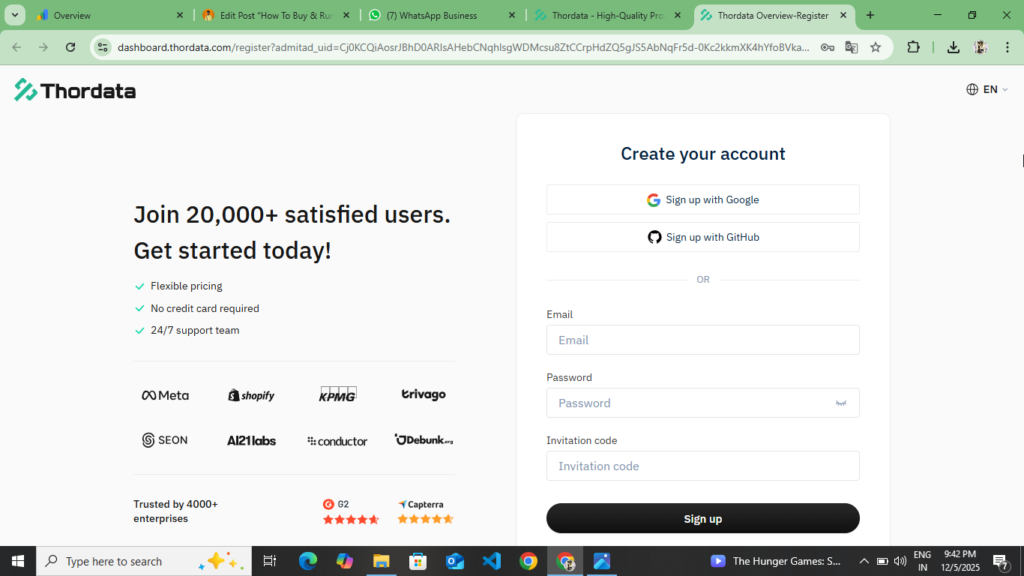
Creating an account on the Thordata Proxy website is very easy and simple. You can create your account here in two ways. Firstly, you can create your account by continuing with Google and secondly, you can create your account by adding your email and password. If you continue with Google, then select your Gmail and create your account by clicking on the Continue with Google option. If you want to do it manually by entering your email and password, then read the following points completely.
- First of all, you have to open your browser. After opening the browser, you have to search for Thordata Proxy. You will see the first or second website and at the end of these points, you will find the official link of this website. By clicking on it, you will be taken to the official website of Thordata Proxy.
- Now as soon as you come to the official website of Thordata Proxy, you will get to see a complete website here and here you will get to see all the plans, which plans you have to buy and which plans you do not have to buy, you will get to see all of them here, you get to see residential proxy, data center proxy, IP etc.
- Now you will see the Sing Up option on the top, you have to click on it, as soon as you click on it, you have to simply enter your Gmail, enter the password and fill the captcha and create your account by entering the confirmed passport, now as soon as you click on the Create Account option, the Gmail which you had added here will receive a mail on that Gmail, you have to verify your account through the mail.
- Now as soon as you verify your account, after verification, the dashboard of this website will open in front of you and in the sidebar you will see the Plan and Pricing option, you have to click on it, now you have to select the plan which you want to buy and make the payment and after your payment is done you will be taken to the plan.
Now after reading all these points you can create your account and can create it manually. If you do Continue With Google then you can also create your account by doing Continue With Google. In this you do not need to verify your account.
How to buy proxy on Thordata Proxy website
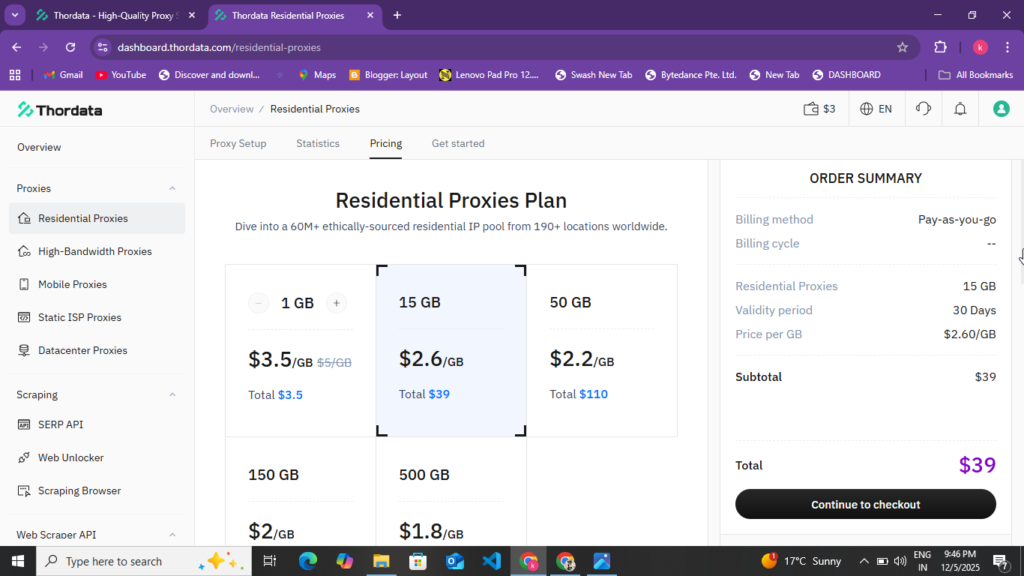
Now you have understood how you can create your account and now it comes to how you can buy the plan here after creating the account and how you can get a refund if you do not like the plan. You can easily buy your plan by following the given points.
- First of all, you have to create your account. If you have not created your account yet, then at the end of the point in which we told you how to create your account, you will find the official website for creating the account. Click on it and create your account.
- Now after creating the account, you get to see the dashboard. In the sidebar of the dashboard, you get to see the Plan and Pricing option, you have to click on it. Now the plan which you want to buy here, you get to see Residential Proxy, Data Center Proxy, and IP, you have to buy any one of those plans. I recommend you to buy Residential Proxy. Now you have to select the plan of Residential Proxy.
- Now after selecting the Residential Proxy plan, you will see the payment option. You can make the payment using debit card, credit card, cryptocurrency and many other payment methods. Before making the payment, you will see the Apply Coupon option. Click on the Apply Coupon option and apply the coupon you find on the home page of this website. You will get a discount of 5% to 10%. After receiving the discount, you will have to make the payment.
- Now as soon as you make the payment, your payment will be deducted and after that you will be redirected to the plan you had purchased.
Now by following all these points you can create your account here and can easily buy the plan you want to buy. Now after buying the plan, we are going to give you information about how you can add these proxies on the Anti Detect browser and run the proxy. Here you get to see many types of plans like Residential Proxy, Data Center Proxy, IP Proxy. You can easily buy the plan you want to buy by selecting it. Before buying, you must apply the coupon. After applying the coupon, you can get a discount of two to three percent.
PopCash.Net Best Adsense Alternative Website With Full Review And Approval Process :- Read More
Some of the benefits of working with Thordata Proxy
What benefits can you get from working with Thordata Proxy? By reading the following table, you can understand what benefits you will get from it and also understand the details.
| Benefit | Description |
| Reliability Network | 60M Proxy IPs 190+ Countries |
| 99.9% uptime | Almost never down |
| 99.7% success rate | Most requests are successful. |
| Less Blocking | Residential IPs are not easily blocked |
| high speed | High-speed data transfer |
| 4000+ Enterprises | World Sails by the World’s Top Companies |
| Versatile Solution | proxy scrape api all in one place |
| Excellent support | 24/7 customer support |
What are all the Thordata Proxy plans?
Thordata Proxy has different pricing based on different plans. You can understand which proxy you will get at what price and also understand its features by looking at the following table.
| Proxy Types | Price | Properties |
| Residential Proxies | Starting at $3/GB | 60M+ IPs, 99.9% uptime |
| Mobile Proxies | Starting at $3/GB | 4G/5G IP |
| Static ISP Proxies | Starting at $3/IP | Unlimited Bandwidth |
| Datacenter Proxies | Starting at $1.5/IP | The cheapest option |
| Web Scraper API | $1/I1000 result | 120+ scraps |
| SERP API | Free Trial | search results |
| Web Unlocker | Free Trial | CAPTCHA ByPass |
How to Run Thordata Proxy Website Proxy on Anti Detect Browser
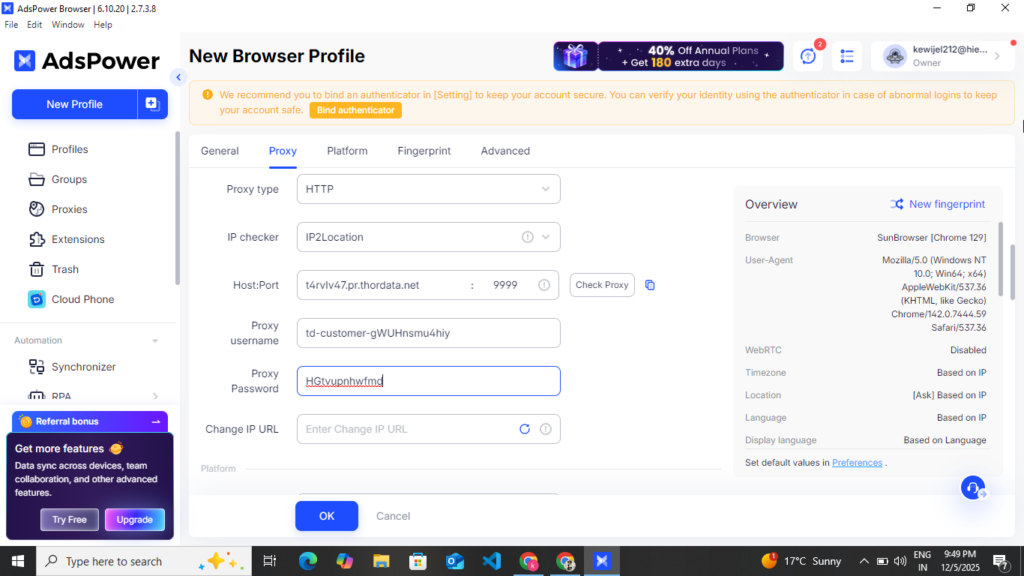
After purchasing the proxy plan from Thordata Proxy website, how can you run it on any anti-detection browser? By following the below given points, you can run these proxies in any of your browsers. You can easily add and connect these proxies to Ads Power, OctaBrowser, GoLogin and any other browser and run them.
- First of all you have to download any anti-detection browser, you will get many types of anti-detection browsers on Chrome like AdsPower and OctaBrowser, similarly you get a list of all the browsers, you can download any of them, we are going to tell you about AdsPower, just like we run it on AdsPower, similarly you can also run it by installing it on any browser.
- First of all you have to download it from your browser and install it on your PC, as I tell you on AdsPower, so I download AdsPower from my browser and install it on my PC.
- Now after installing it on the PC, as soon as I open AdsPower, I see the option to create an account there. First of all, you have to enter your First Name, Last Name and your email address and get the OTP sent. As soon as you send the OTP, the Gmail you had added here will receive a mail on that Gmail. You have to verify your account through that mail, fill the captcha and click on the Create Account option. Enter the OTP that comes, after that fill the captcha and click on the Create Account option.
- Now, when you click on the Create Account option, a complete browser opens in front of you. Now, in the browser, you have to first create your profile. Now, at the top, you get to see the Create Profile option or you get to see the Add Profile option. As soon as you click on that option, a page opens in front of you in a new dashboard.
- Now on that page, you have to first enter your profile name. After entering the profile name, you have to scroll down and you will see the option of ip2 location or custom profile or custom proxy. Click on it and then select HTTP.
- Now after doing all this, you have to open the plan which you had purchased from the website of your Thordata Proxy or open the website of Thordata. First of all you have to create your proxy on Thordata. To create your proxy, you have to first select the country. If you want to target a state, then you can also select the state, like I select United States. Now after selecting United States, you have to select HTTP at the bottom or select HTTP and keep your proxy type selected. Now keep it Sticky, later you can also keep your Rotate. Now select your host name, then port name, then username, then passport option and copy a proxy from here.
- After copying the proxy, you have to come back to AdsPower. After coming to AdsPower, you have to paste the proxy as it is. First comes the host name, after that comes the part name, after that comes the username, after that comes the password and further you get to see the option of check proxy, by clicking on it you have to check your proxy. Now as soon as your proxy connects here, then the proxy of the location for which you had selected your proxy will be visible.
- Now you will see the option of New Fingerprint on the side, you have to click on it and at the bottom you will see the option of Create Profile, you have to click on it, now your profile has been created here, now you will see the option of Open or Run on the front side of the profile, you have to click on it, as soon as you click on it, your proxy browser will open in a new tab here, now you can access the account which you want to access here or you can create your account here and by putting that account here you can access it from here like you can access Facebook, Twitter, TikTok etc. accounts from here and can also save your account from getting blocked.
So now you can keep all these accounts safe by following all these points. Along with this, you can create your account here on AdsPower. Along with this, you can also run your proxy by adding it on AdsPower. Now, just like we had added our proxy on AdsPower, created the proxy and connected it to the location in the proxy, now in the same way, you can add your proxy on any browser and run it.
Some more information about the Thordata Proxy website
Thordata Proxy is an industry-leading proxy service provider that meets your web data needs with over 60 million IPs, 99.9% uptime, and comprehensive scraping solutions. Its combination with Anti Detect Browser becomes a powerful force. By following the steps given in this blog post, you can easily create a Thordata Proxy account and purchase the right plan. You can also understand how to download Anti Detect Browser on your PC or laptop. After downloading, how to connect it to the proxy, how to access your account from there, and how to keep your account safe.
Disclaimer :- This blog post is not for any kind of promotion or sponsorship. Through this blog post, it is explained to the user that how you can save your account from getting hacked by purchasing a proxy and keep your account safe. In this blog post, the use of proxy for wrong purposes is not taught. You have to use these proxies for the right purpose so that you can keep your account safe and save them from getting blocked and deleted.