
Are you also looking for a good alternative to Google AdSense, or is your website getting decent daily traffic but you’re still earning zero? If so, believe me, you’re not alone. I’m going through the same problem. These days, getting AdSense approval isn’t easy. Even when your content is good, despite having good content, still get rejected, and many bloggers, because of this, decide to quit blogging. In such cases, ad networks like AdsKeeper are slowly are slowly becoming popular, especially among publishers whose websites get traffic but can’t monetize it properly. If you want to work with AdSense, your website must have high-quality content and a good dashboard; only then will you get approved.
And even if you’ve already gotten AdSense approval, you can still monetize your website by using AdsKeeper and further increase your revenue. AdsKeeper is a native advertising platform network that gives blogs and websites the opportunity to earn revenue by displaying different types of ads. Over the past few days, I’ve noticed that many new and mid -level bloggers are shifting to AdsKeeper, and a big reason is its truly easy approval process. I myself got approval for AdsKeeper on my website, and honestly, I was doubtful at first—whether I’d get approved, how much traffic I’d need, and if I’d actually earn anything. If I did earn, would I be able to withdraw it to our bank account or or not But after applying properly, my website was approved, and then I practically understood how AdsKeeper works and how it generates revenue.
Based on this experience, in this blog post I’m going to share with you the complete AdsKeeper approval process, the necessary requirements, and realistic ways to earn, step by step—without any fake promises or over-hype.
If you’re truly looking for an AdSense alternative that works even for beginners, and if you already have Google AdSense approval, you can still improve and increase your revenue by placing ads from this AdSense alternative website. Read this blog post in full before creating your account and applying for approval. What requirements do you need to get approval?
What Is AdsKeeper

AdsKeeper is a native advertising network, which means the ads that appear in it look like part of your website’s content rather than being forced in like banners. That’s why users notice these ads more naturally and are more likely to click on them. In simple terms, if I were to say it, AdsKeeper displays ads like this: They appear below your blog post, in the middle of an article, or in formats like “Recommended for You,” so they don’t disrupt the user experience and actually increase click-through rates. The biggest advantage of AdsKeeper is that it works with content-based ads—showing visitors ads related to what they’re reading. That’s why they’re called native ads.
Which websites is AdsKeeper most useful for
AdsKeeper performs especially well on websites whose content is related to news and current affairs, as well as entertainment and information blogs. If users visit your site to read content rather than just to buy products, a native ad network like AdsKeeper can be a great monetization option for you.
I’ve personally noticed that native ads irritate users less than traditional banner ads and, in the long run, have a positive impact on both website engagement and earnings.
DL.Surf Review How to Earn Money by Uploading Files (Full Guide) :- Read More
Requirements for AdsKeeper Approval
To get approval from AdsKeeper, your website must meet some basic but essential requirements. If you follow all these points correctly, your chances of approval increase significantly. You need to fulfill the following conditions and, after reading them, make improvements to your website. Then apply here so that your website get approved easily and start your blogging journey by placing ads
Traffic Recruitment
According to AdsKeeper’s official terms, your website must have at least 3,000 unique visitors per day. Here, not only the quantity of traffic but also its quality is taken into account. If your website’s traffic comes from search engines like Google, social media platforms, and direct visits, then this is a positive signal for AdsKeeper. signal. Fake bot traffic and improperly sourced traffic can cause problems with approval. If you bring in bot traffic or fake traffic, there’s a chance your website will be rejected.
Content Quality
AdsKeeper prioritizes websites with entirely original content that is informative and useful for users, and not written solely for the purpose of displaying ads. Copied or very short, low-value content reduces the chances of approval. You should post high-quality content and maintain its quality to ensure You can also get AdSense approval and increase your earnings by placing AdsKeeper ads alongside AdSense ads.
When writing content for your website, it’s essential to follow all policies and maintain high content quality so you can easily get approval and improve your content’s quality, which increases user engagement and boosts the website’s authority.
Website Design And Layout
AdsKeeper also checks your website’s design and user experience. Make sure your website’s layout is clean and professional, opens correctly on mobile, and doesn’t have excessive pop-ups. A clean design makes your website appear trustworthy.
Your website should not contain any policy-violating content. It should be clean and provide a good user experience so that AdsKeeper approval can be easily obtained. This will also increase engagement and user retention.
Legal Page
To get approval on AdsKeeper, your website must have the following pages; only then can your site receive AdsKeeper approval.
- About Us
- Contact Us
- Privacy Policy
These pages demonstrate that your website is a responsible and trustworthy platform. It’s best to clearly include all of these pages in your site’s portal.
How to Create an Account in AdsKeeper & Submit Your Website for Approval
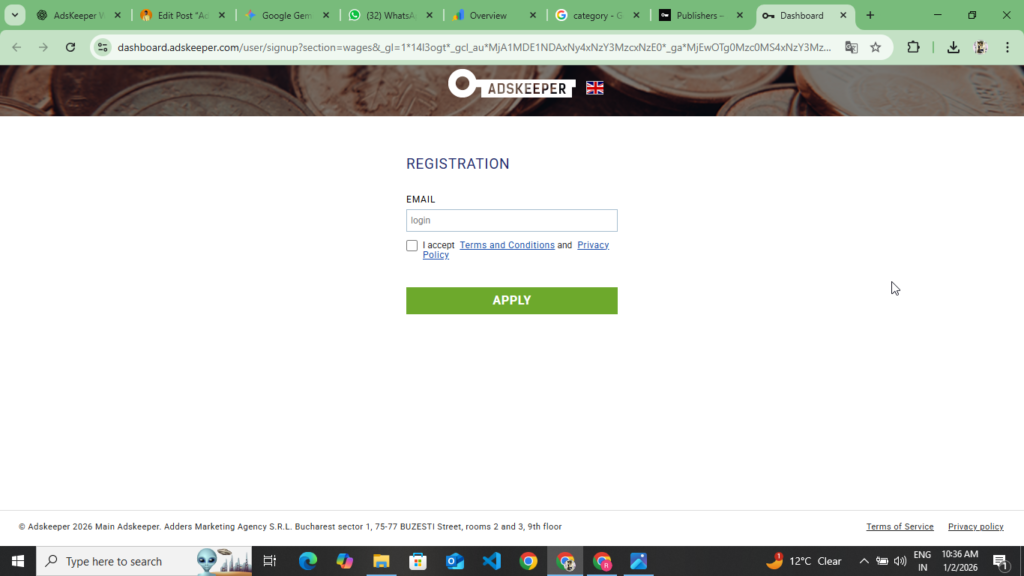
If your website meets AdsKeeper’s basic requirements, the next step is to create an account and submit your website for approval. This process isn’t very complicated; you just need to follow the correct steps. By following the points given below, you can easily create your account and submit your website for approval. are
- First, you need to go to the official AdsKeeper website. The link to this site will be at the end of these points, and you can also click on it to go there. Now, as soon as their official website opens, the first thing you should do is look it over and read all the information carefully.
- After getting all the information, two options will appear at the top for you. When you click “Sign Up” or “Get Started” option, a new screen will appear with two choices: Advertiser and Publisher. You need to select Publisher, as you want to get your website approved to earn revenue.
- Now a registration form will open in front of you where you will have to fill in some basic details. Here, you must first enter your name, then your email ID, then your password, and your country. Fill in all the information correctly and carefully because all future communication will be through this email. After submitting the form, a verification link will be sent to your email. Click on that link to verify your account. This link will be sent to the Gmail address you submitted here.
- Now as soon as you verify your Gmail and verify your account, the AdsKeeper account or dashboard will open for you, where you will see the publisher dashboard. Next to it, you will also see an advertisement option, but if you want to monetize your website here, then here you will need to be a publisher. – You need to stay on the Dashboard.
- Now your account is all set up and verified. On the dashboard, you will see an “Add Website” or “Add New Site” option. Click on it and enter your website’s URL and domain, and select your website’s Category. Here you will find options like News Blog, Entertainment Category. Select the category that your website falls under.
- Now, after selecting your website’s URL and Category, you need to verify your website’s ownership. To verify ownership, you are given two methods: the first is a Meta Tag, and the second is uploading a file. You should select the Meta Tag option, go to your WordPress website, open the admin panel, and navigate to the Head section. paste the Meta Tag under the Head Tag, and then return to AdsKeeper to verify your website ownership.
- Now your website has gone into review. It will remain in review for 24 to 30 hours. After that, if your website has valuable content, no privacy policy violations, and good content quality, you will receive approval. Then you can place ads and serve them to your audience. monetize
How to start earning more with AdsKeeper and the correct format for placing ads
After receiving approval from AdsKeeper, the next and most important step is to place the ads correctly, because simply adding ads won’t generate revenue. The right ad type, placement, and options bring in good revenue. By following the points given below, you can maximize your earnings and place ads properly.
How to set up different types of ads units
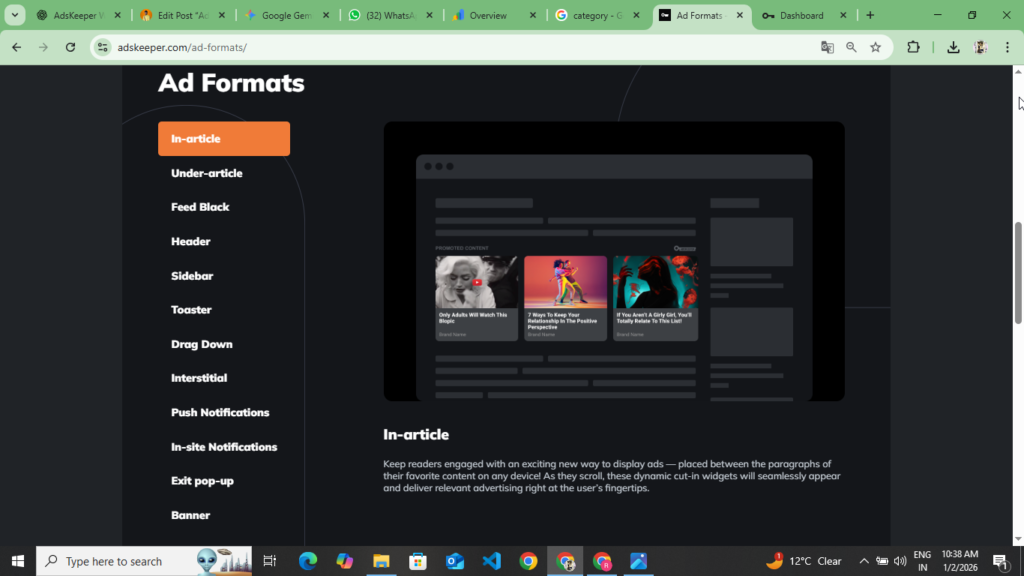
AdsKeeper offers its publishers a variety of ad formats that you can choose according to your website. You can use the following ad formats, and all the information on how to place them is provided below.
- Native Ads: This is AdsKeeper’s most popular ad format. You can place these ads between or below your content. They look like “Recommended For You” or “You May Like,” and they blend naturally with the content, so they get a high CTR.
- Mobile Ads: If most of your website traffic comes from mobile users, you can start using mobile-optimized ads. These ads adjust to mobile screen sizes, load quickly, and don’t disrupt the user experience, keeping visitors on your site and maintaining high engagement.
- Smart Widget: A Smart Widget is an auto-optimized ad unit. AdsKeeper decides for itself which ads to show, how many ads to display to the user, and which ad to serve. This option is very helpful for beginners.
Where To Place Placement Ads To Keep CTR High
Incorrectly placed AdsKeeper ads reduce CTR and also degrade the user experience. Therefore, choose ad placement very carefully for the most effective results.
- In the middle of a blog post
- In the middle of a long article’s content
- Below the related posts section
Also, avoid placing ads in the following places. Follow these points:
- Too close to the header
- Placing too many pop-up ads
- Placing ads where they make the content difficult to read
Remember, the user comes first, and ads come second. This is the secret to long-term earning.
The Right Strategy for More Revenue Optimization
To earn good money from AdsKeeper, simply placing ads isn’t enough. You also need to do some optimization: identify your high-traffic pages, test ads on those pages, and don’t put more than two to three placements on a single page. Mobile and desktop performance are different. Check mobile and desktop performance separately. I’ve personally seen that when ads are focused only on popular pages, overall revenue improves noticeably.
AdsKeeper V/S Adsense
| Points | AdsKeeper | Adsense |
| Ads Type | Native Ads | Text, Display Ads, Native Ads, Video Ads, Banner Ads |
| Approvel Process | A little easy | Quite tough |
| Minimum Traffic | Approximately 3000 daily unique visitors | No fixed traffic, but quality is essential. |
| Monetization Models | CPC + Egagement | CPC (Click Per Click) |
| CTR (Click Through Rate ) | It’s good to be | It depends on the niche and traffic quality |
| CPM/CPC Models | Depends on the medium traffic type | High potential (Tier – 1 Country ) |
| Ad Placement | Between the content and the recommendations | between the header and the sidebar content. |
| User Experience | Better ads get embedded in the content | If the placement is right, it can be distracting. |
| Mobile Performance | Very Good Performance | Good |
| Adsense Friendly | Yes, they can be used together. | — |
| Best For | News Website, Enternement Blog, Tech Website | Niche, Long Term Authority Blogs |
Adskeeper Payment Method & Minimum Payout
You can see from the table below which payment methods are available on Adskeeper and what the minimum payout is.
| Points | Description |
| Payment Method | Bank Transfer, Paypal |
| Bank Transfer | Payments will be made directly to your bank account. |
| Paypal | Direct cash to your PayPal account. |
| Miniumine Payout | Approximately $50 to $100. |
| Payment Cycle | Usually makes a monthly payment. |
| If the threshold is not met | Any remaining balance carries over to the next month. |
| First Payment Verification | For the first time, verification may occur before the payout |
| Tax / Payment Details | it is necessary to provide the correct bank and tax details |
- You won’t receive payment until your earnings reach the minimum payout limit.
- Once the threshold is met, the payment is sent in the next cycle.
- Choose a payment method that is safe and convenient for you.
Pros and Cons of AdsKeeper
Before using any ad network, it’s important to know its advantages and limitations. AdsKeeper is no different. Below, I’ve outlined its related pros and cons. Read them thoroughly, then create your account and submit your website for approval.
Pros of AdsKeeper
- If your website gets good traffic, the AdsKeeper approval process isn’t very difficult. Approval is relatively fast, especially for news, entertainment, and information sites.
- Because AdsKeeper features native ads, it delivers a high CTR, which can boost earnings. With the right placement on high-traffic pages, the revenue becomes noticeable.
- AdsKeeper is fully AdSense-friendly, so you can run it alongside Google AdSense, helping you boost your website’s overall earnings.
Cons of AdsKeeper
- If your website has low daily traffic, getting approved can be a bit difficult. AdsKeeper mostly approves high-traffic websites.
- AdsKeeper’s minimum payout limit can be a bit high, which can make it somewhat difficult and time-consuming for beginners to receive their first payment. Here, the minimum payout is set at $100.
Find out if AdsKeeper is right for you with this information
AdsKeeper can be a better option and an AdSense alternative, especially for those whose websites have good traffic but aren’t getting Google AdSense approval or aren’t earning as expected with AdSense. In such cases, AdsKeeper can become a reliable monetization option, particularly for news and entertainment. and information websites.
Because of its native ads, AdsKeeper doesn’t disrupt the user experience as much and has the capacity to deliver good earnings with proper placement. This is why many publishers are using it alongside AdSense or as an alternative.
And if you want to get approved and earn well with AdsKeeper, don’t chase shortcuts. First, focus on quality content—write for users, not just ads. Grow your traffic naturally, keep your website clean and trustworthy. My personal experience says that when the content str s strong and the website feels genuine, approval comes on its own.
AdsKeeper is not a magic tool, but with the right strategy, it can give your website’s earnings a new boost. If you take long-term blogging seriously, it’s wise to see AdsKeeper as a smart monetization partner.
FAQ In AdsKeeper
Q1. Can AdsKeeper be used with Google AdSense?
Ans :- Yes, AdsKeeper is fully AdSense-friendly. You can run both on the same website at the same time; just make sure the ad placement is correct.
Q2. How long does it take for AdsKeeper approval?
Ans: It usually takes 3 to 5 business days for a website to be approved by AdsKeeper. If your site meets the requirements, approval can be granted sooner.
Q3. What is the minimum traffic required for AdsKeeper?
Ans: According to AdsKeeper’s official requirements, your website must have at least 3,000 unique visitors per day. Traffic quality is equally important.
Q4. Will AdsKeeper work on a low-traffic website?
Ans: To be honest, AdsKeeper can be a bit challenging for low-traffic sites. This network generally works best for high-traffic blogs and news sites.
Q5. What is the minimum payout for AdsKeeper?
Ans: The minimum payout for AdsKeeper is generally between $50 and $100. The exact amount depends on the country and account type.
Q6. How does AdsKeeper make payments?
Ans: AdsKeeper primarily transfers payments to a user’s account via bank transfer and PayPal.
Q7. What websites is AdsKeeper best for?
Ans: AdsKeeper is especially best for news websites, entertainment blogs, and information & high-quality traffic blogs.
Disclaimer : – The review of the AdsKeeper website is not a form of sponsorship or promotion. This website was reviewed so that users can monetize their own sites. Users who are unable to get Google AdSense approval and want to start their blogging journey can use this ad network, and if any users who have already received Google AdSense approval but are frustrated by low earnings can place this website’s ads alongside their Google AdSense ads to increase their earnings.